Desktop web · Started October 2026
Franklin
A tool that turns screen recordings, documents and links into short courses. Each course has video demos, written steps and a quiz after each section.
- RoleCreator — research, design, build
- PlatformDesktop web
- IndustryWorkplace training
- Built withAI-assisted prototyping (Claude Code)
Role
I researched, designed and built Franklin.
Training was in long meeting recordings.
Teams teach a tool by recording a meeting. A new person must watch the full recording to find one step. The person who shares the recording cannot see what people learned.
Four steps from sources to a course.
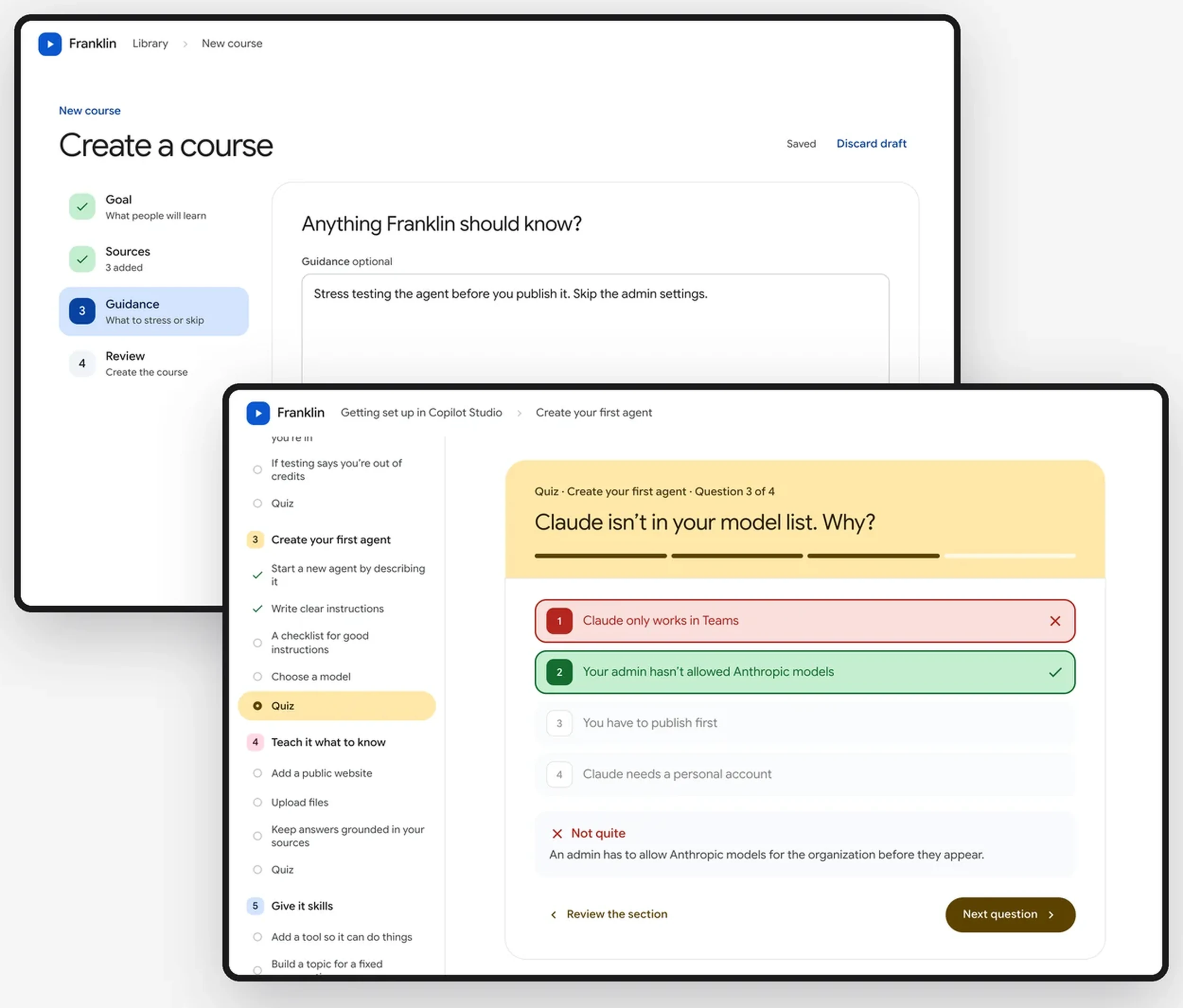
The course builder, from goal to a finished course. Sample data for a fictional company.
Goal. The author writes what people must be able to do after the course, and who the course is for.
Sources. Up to three recordings, plus PDFs, slides, documents, images and links. Franklin reads each link when it is added. A page behind a sign-in is flagged at once.
Guidance and quizzes. The author says what to stress or skip, and sets 3, 4 or 5 quiz questions per section.
Review and build. One page shows every choice, with an Edit link for each. The draft saves after each change.
Outcome
Two courses, each a private link.
Short demos, written steps and a quiz.
A learner opens the course from a link. Each step shows a looping demo beside the written instructions. Underlined words open a plain-language definition. After the last step of a section, the learner takes the quiz and sees a score with the explanations.
Status
I started Franklin in October 2026. It has two courses. Each course is shared as a private link. The demos in shared courses are recreated with sample data, so no internal content leaves the team.
Shared-screen demos
Each demo shows only the shared screen.
How Franklin writes a course.
Private by default
Recordings never leave the author’s Mac.
Recordings stay on the Mac
Recordings, transcripts and drafts never leave the author's computer. Only the finished course is published.
Answers are checked on the server
Learners never receive the answer key. They can retake each quiz as many times as they want.
Results for the author
The author sees who finished, each learner's best score and first-try score, and can download the results as a CSV file.